For independent self-storage owners

Built by owners.
For owners.

Your day is full enough. Bring your units, tenants, payments, and paperwork together in one practical workspace.

StorVaultOS Offline puts the everyday work of running your storage business on your Windows computer.

Windows 10 & 11 · 64-bit · Offline edition

A clearer view of your day
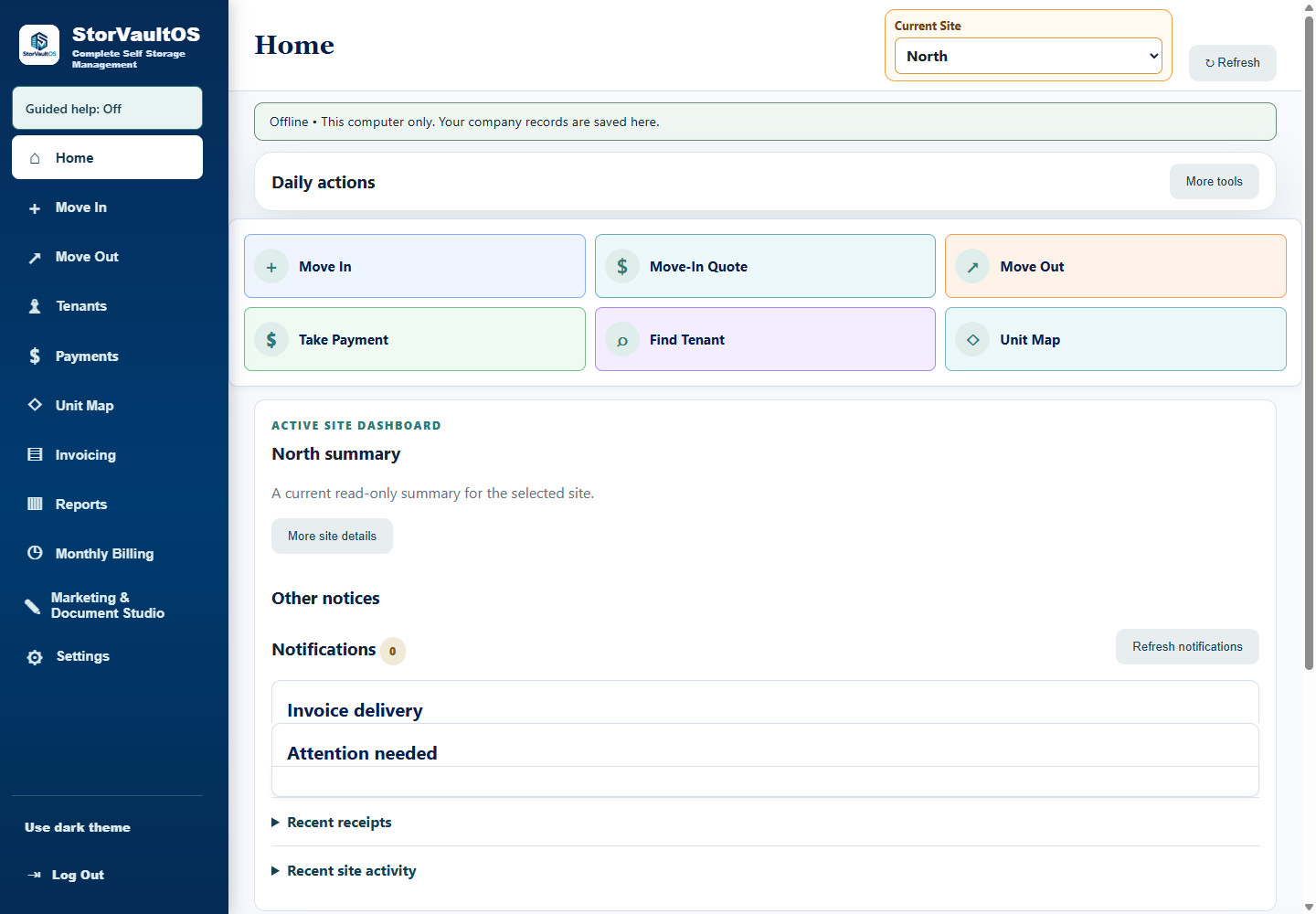
StorVaultOS Home screen with daily actions and the selected North facility in a fictional companyView larger
Actual product screen · Fictional company and facility
Your office. Your records. Your control.Day-to-day work, even without an internet connection.
Designed for the storage officePlain-English workflowsLocal company recordsHistory you can look back on

We know the work

Software that understands
a storage owner’s day.

The phone rings. A tenant walks in to pay. Someone needs a larger unit.

StorVaultOS is built around those everyday moments. Find the right record, see the account, prepare the paperwork, and get back to running your business. Clear information and familiar actions keep the work moving.

The everyday essentials

From the first inquiry
to the last receipt.

Connected records make it easier to follow the work from an available unit to a tenant’s account and rental history.

01 / Inventory

Know your units.
See your availability.

Keep unit numbers, sizes, rates, and occupancy together. Use your facility map to find units, and upload a reference image to help arrange the layout.

  • Unit and availability records
  • Facility maps and image guides
  • Move-in, transfer, and move-out workflows
02 / Tenant records

The whole account,
within reach.

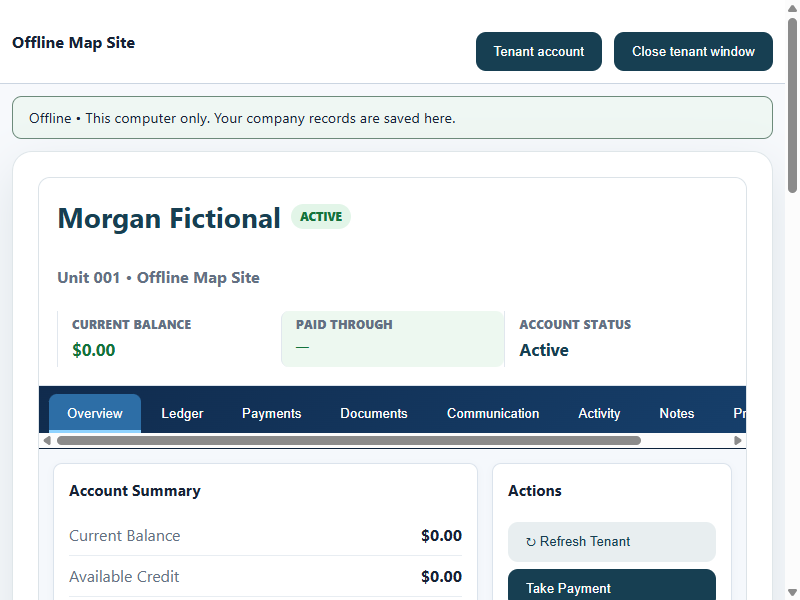
Open a tenant’s record to review their units, current bill, payments, documents, and notes. Keep rental history available when a customer moves out.

  • Tenant and multi-unit account records
  • Itemized current bills
  • Reviewed spreadsheet imports
03 / Office finances

Keep the numbers
and the history.

Review monthly billing before posting it. Record cash, check, and money-order payments, produce receipts, and look back at the account when a question comes up.

  • Staff-reviewed monthly billing
  • Payment and receipt records
  • Credits, reversals, and account history
04 / Paperwork

Less hunting.
More getting it done.

Prepare routine tenant documents, notices, and printable paperwork from the same workspace as your accounts. Keep the record of what was created.

  • Document templates and merge fields
  • Tenant notices and documents
  • Printing and saved document history
05 / Facility oversight

Stay close to
the details.

Switch between your facilities and review occupancy, balances, payments, and activity in context. Use reports to understand what needs attention at the office.

  • Multiple facility records
  • Facility-specific views and reports
  • Operational and financial reporting
06 / Your records

A practical start.
A safer backup.

Review CSV, TSV, or Excel tenant imports before applying them. Create password-encrypted company backups and keep a copy on a separate drive.

  • CSV, TSV, and XLSX imports
  • Password-encrypted backups
  • Backup restore on a licensed installation

The Offline edition

Your business keeps moving.
Even when the internet doesn’t.

Installed on your Windows PC. Company records stored on that computer. Everyday work stays available offline.

Explore the edition

One computer, a complete workspace

Manage your company and its facilities from one Windows installation. This edition does not share a live database across computers.

A license for your installation

The existing activation code is specific to your installation and does not expire. One purchased license covers one computer in use at a time.

Backups stay in your hands

Create an encrypted backup, keep the password safe, and store a copy separately from your PC. Backups are essential for moving or recovering your records.

Choose the right fit. Offline records payments taken outside the app. It does not include integrated card processing, autopay, a public tenant portal, online rentals, email or SMS delivery, gate control, or cloud synchronization.

Get a feel for the workflow

A free demo.
A fresh start.

The Windows program includes a free fictional demo you can explore before activation. Try the sample records without using your company’s real information.

Public download is being prepared. The demo is included in the Windows program.

  1. 1

    Explore with sample records

    See how the screens and daily workflows feel. Demo records are fictional and separate from a real company.

  2. 2

    Choose your installation

    Install the licensed edition on the Windows computer you plan to use at your office.

  3. 3

    Start with your own records

    After activation, set up your company or restore a backup. Demo changes do not become company records.

Made for your storage office

Meet your next
everyday essential.

Practical tools for independent owners who want their records organized and their day a little simpler.

A few things to know before you start
Windows desktop

StorVaultOS Offline

Your facility operations, together on your PC.

$299USD · One-time purchase

  • Tenants, units, and facility records
  • Billing, recorded payments, and receipts
  • Documents, reports, and encrypted backups
  • Free fictional demo included
  • Installation-specific, non-expiring activation

Payhip checkout is being prepared.

Purchase and automatic activation will open after the checkout and license-delivery process has been verified.

Sales not yet open

Requires Windows 10 or 11, 64-bit. One computer in use per license.

Good questions

Know what
you’re getting.

Is this the offline or cloud version?

This website features StorVaultOS Offline for Windows. Your company records stay on the computer running it. It is not a cloud subscription, shared online database, or browser-based customer portal.

Can I try it before buying?

Yes. The Windows program includes a free demo with fictional records, separate from real company data. The public download will be linked here when it is ready. Demo changes do not transfer into your licensed company.

Where do I buy it?

Purchases will be handled through Payhip. Checkout is being prepared; this page will show the verified product link when sales open.

How do I activate the software?

Each activation is matched to the installation on your computer. The current manual process uses the installation request from the app to issue an activation code, which the app verifies locally. Automatic purchase activation is being prepared and is not yet available.

Can I manage more than one facility?

Yes. StorVaultOS supports multiple facility records and facility-specific views. In the Offline edition, those records are managed on the same computer; they are not automatically synchronized between offices.

Does it process cards or control my gate?

No. Offline records cash, check, and money-order payments taken outside the app. Integrated card processing, autopay, gate control, public online rentals, and email or SMS delivery are not included in this edition.

What happens if I replace my computer?

Keep a current encrypted backup and its password. Moving to a replacement computer requires a replacement activation and restoring your backup. One purchased license covers one computer in use at a time. Automatic replacement activation is not currently available.

Can I bring in existing tenant records?

You can review and import tenant data from CSV, TSV, and XLSX files. Review the proposed records before applying an import and keep a backup of your source information.

Product preview · Fictional data